Client intake, from one email to a signed service agreement
Getting a new ignition interlock client ready for their installation used to be a back-and-forth: staff chasing details, sending forms, re-typing answers, preparing the agreement. Now it is one link, sent to an email address, that opens the form.
By the time the client closes the tab, their client record, their vehicle and their signed agreement are all in Odoo.
CLIENT
Integrity Interlock LLC
Wisconsin (United States)
SECTOR
Ignition interlock service
FORMS & FLOWS LIVE
Client intake · Vehicle transfer
DELIVERED
2025
THE CLIENT
Integrity Interlock LLC
Integrity Interlock LLC has been installing ignition interlock devices in Wisconsin since 2011, from locations in Appleton, Green Bay, Oshkosh and Sheboygan. Their devices are often referred to as IID or BAIID, short for breath alcohol ignition interlock device. It is approved by the state and by the Wisconsin Department of Transportation to install the LCI-777, and says it has installed thousands of Ignition Interlock devices in the state of Wisconsin.
Its clients are, for the most part, drivers under a mandate following an OWI conviction. That is an unusual kind of customer: one who did not choose to be there. The company is direct about it. The device, it writes, is often not always welcomed but is required to drive legally. Saying so plainly sets the standard the service is held to. If someone has to be your customer, the least you can do is not waste their time.
"Our mission at Integrity Interlock LLC is to assist drivers who need an ignition interlock device to get back on the road as inexpensively and as quickly as possible, all the while ensuring safety for all drivers and meeting any state mandated requirements."
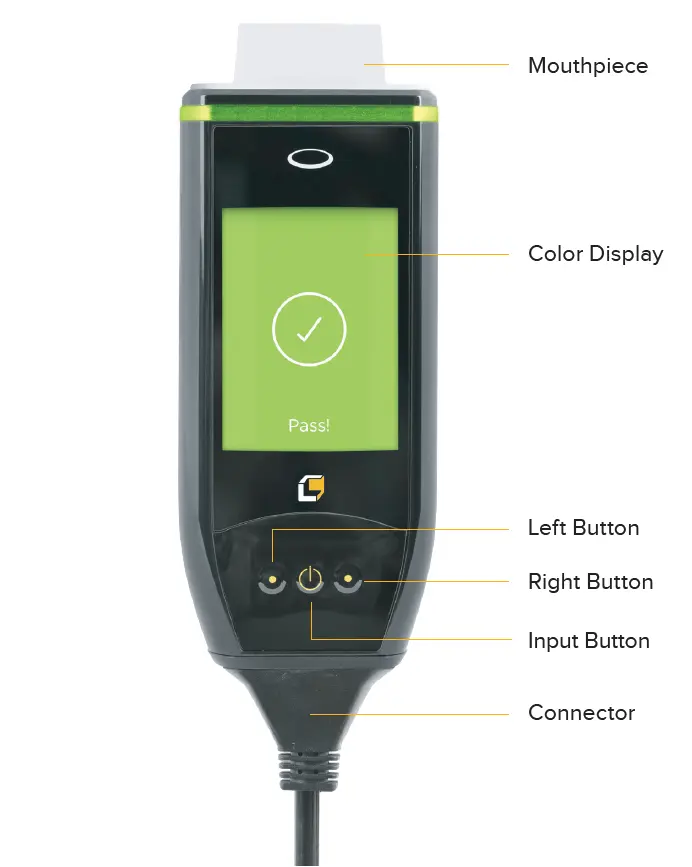
Low Cost Interlock 777 (LCI-777)
WHERE NOVA FORMS SIT
Before step one
Integrity Interlock publishes its process as three appointments: installation, a recurring calibration, and removal. The first is the long one. It is where the device is installed and explained. It is also where, by the company's own description, the client sits down to complete the required paperwork.
The paperwork is the part this project moved. The intake and the signed service agreement now happen in the client's own Odoo portal, a form to fill in and then the agreement itself to sign, before they travel to a location at all.
STEP 0
Intake & agreement
Online, in one sitting, before the client sets off. Added by Nova Forms.
STEP 1
Installatation
The long one: paperwork (moved to step 0), instruction on the device, and the install itself.
STEP 2
Calibrations
The recurring appointment, until the device comes off.
STEP 3
Removal
An authorized removal ends the mandate.
Steps 1–3 summarize Integrity Interlock's published process; see integrityinterlock.com/process for the current detail. Step 0 is what this project added in front of it.
WHAT HAS TO BE COLLECTED
Everything has to be right before the appointment
The installation appointment is the deadline for a stack of things (data capture, agreement) that have nothing to do with the installation on site. A complete client record has to exist first: identification and contact details, license and mandate information, and the supporting contacts the program requires.
The vehicle has to exist as a record before a device can be installed on it: VIN, year, make, model, plate, etc. If the client is not the registered owner, that has to be flagged so consent can be chased. Supporting documents have to be filed against the client and vehicle records, not left in an inbox.
And a service agreement has to be signed. Not a generic one: an agreement that names this client and this vehicle, with the VIN and plate printed on it correctly, because those are the details a compliance audit checks.
None of that is new work: every one of those facts had to be collected anyway. What it cost was the collecting: chased in pieces before the appointment, finished at it, and keyed into Odoo afterwards.
THE FLOW: WHO ACTS, AND WHEN
Seven steps. Their client is in three of them.
1️⃣ BACK OFFICE 2️⃣ CLIENT 3️⃣ Odoo
1️⃣ BACK OFFICE
Open the contact, pick and send the form
A member of staff:
- Opens the client's contact record.
- Presses the button "Create and send Form with portal access".
- Picks and sends the intake form.
That is the whole of the manual work.
Forms • Contacts: the portal wizard, run from any contact.
The installation appointment is the deadline for a stack of things (data capture, agreement) that have nothing to do with the installation
2️⃣ Odoo
Portal user, form and invitation, in one press
The wizard creates a portal account for the client if there isn't one, reuses it if there is, and reactivates it if it was archived. It creates the intake form addressed to that contact, and emails the invitation: a sign-up message for a brand-new account, a plain login message for an existing one. Both links are written into the contact's chatter and the form's, so anyone picking up the file can see exactly what was sent.
3️⃣ CLIENT
One link, straight into the form
The client sets a password and lands on their own intake form. No portal to navigate, no form to find, no second login. The redirect is carried through the sign-up, so activating the account and opening the form are the same click.
4️⃣ CLIENT
Fill in the form, upload paperwork in the form, submit
Their details, the mandate, and the vehicle. Make and model come from Odoo's own fleet catalog, with a free-text fallback for anything not listed. An interlock fleet has more twenty-year-old oddities in it than a catalog does. Supporting documents are uploaded here.
5️⃣ Odoo
The form submission becomes records
On submit, the contact is updated from the answers, the fleet vehicle is created against the client as its driver, and the uploaded documents are copied onto the contact and vehicle, so they are filed where the compliance team looks for them, not buried in a form submission.
6️⃣ Odoo
The (sign) agreement is prepared, already half-signed
The service agreement is created from a Sign template, with the client's answers and the new vehicle's details filled into its placeholders. The company's own side of the document is completed and counter-signed automatically, so the client is never waiting on a colleague to get to their inbox.
Forms • Sign: the submitted form is the source of the document.
7️⃣ CLIENT
Sign it, in the same session
Instead of an email round trip, the client is taken from the submit button straight to the signing page, still logged in, with their own name, address, VIN and other vehicle information already on the document. They sign. The executed agreement is filed against the contact and against the vehicle.
Staff touch it once, at the start. The client's part is three steps in a single sitting. Steps 5 and 6 fall between submitting and signing, in the time it takes the page to turn. Everything else is Odoo.
HOW IT HOLDS TOGETHER
Three ideas doing the work
1. ADDRESSING
A form is addressed to a person
The portal wizard makes one object out of three that are normally separate: the contact, the portal login, and the form they owe you. Because the form is created against the contact, everything downstream knows whose it is: who to update, whose vehicle to create, who signs.
The invitation link is prepared before it is sent, so a later grant of portal access from elsewhere in Odoo cannot quietly invalidate a link already in a client's inbox.
Forms • Contacts formio_partner
2. DOCUMENTS
The document fills itself
Signature fields on the agreement are not typed in and are not baked into a PDF. Each one points at a question on the form, and resolves against the submission at the moment the document is rendered: the label the client actually saw for a choice, the date spelled the way their language spells it.
For Integrity that binding was extended to reach the fleet vehicle too, so the VIN, plate, year, make and model print from the record rather than being transcribed by whoever prepared the agreement.
Forms • Sign formio_sign
3. TRACEABILITY
A signature knows its vehicle
Every signature request carries the vehicle it concerns, alongside the form it came from. Sign's own list, kanban and filters were extended to show it, so "which agreements are outstanding on this car" is a question you answer by searching, not by opening PDFs.
Fleet & Sign integration
THE SECOND FORM & FLOW
A vehicle transfer is the same machine, differently loaded
Interlock clients change cars mid-mandate. A lease ends, something is written off, and the device has to move with them. That is a different form, but not a different system.
Staff run the same wizard from the same contact and pick the vehicle being transferred from; only the client's own vehicles that haven't already been transferred are offered. The client fills in the replacement vehicle, submits, and the two records are linked in both directions: the old one is marked transferred and points at its successor, the new one points back at what it replaced. A fresh agreement is prepared and signed in the same sitting.
The chain of vehicles a client has run a device on stays legible years later, which is the form a regulator asks the question in.
THE RESULT & BUSINESS OPTIMIZATION
A fixed cost removed from every case
DATA ENTRY AND VALIDATION | Typed once, by the client. The contact, the vehicle and the agreement are all written from the same submission, so a VIN cannot be right in one place and wrong in another. |
CLIENT EFFORT | One link, one session. Account, form and signature in a single session, with no attachment to print and nothing to bring to the appointment. |
STAFF EFFORT | One press on the contact. No portal user to create by hand, no form to send separately, no agreement to prepare, no counter-signature to chase. |
APPOINTMENT TIME | The longest appointment loses a stage. Instruction, paperwork and installation used to share one visit. The paperwork is finished before the client arrives, so the technician's time goes to the work only a technician can do. |
DOCUMENTS | Uploaded documents land on the contact and vehicle records as the submission is processed, rather than staying only inside a form. |
COMPLIANCE | Every executed agreement is linked to a client, a vehicle and the submission that produced it. Vehicle transfers keep that chain intact. |
ARRIVAL | The client arrives for the installation with nothing left to do but hand over the keys. |
The compounding effect is the operational one. Intake is not an occasional task. It happens once for every new client, and again for every vehicle transfer, across all four locations. What this removed was an effort (time) and cost that used to land on every case: a form to send, a portal account to create, answers to re-type, an agreement to prepare, a counter-signature to chase.
Staff attention goes to the cases that actually need a person, like the vehicle whose make is in no catalog or the transfer that lands mid-mandate, instead of to the ones that only needed processing.
BUILD SHEET
What it runs on
Odoo
Contacts: client records
Fleet: vehicles, makes, models
Sign: templates, requests, roles
Portal: client access
Nova Forms (app, modules)
formio: form builder, forms app
formio_partner: contacts & portal integration, wizard
formio_sign: signature integration
formio_components_api: fields pre-fill, domain and change APIs